
Instead of searching your entire StoryGraph to-be-read list every time you shop, build a short buying list, match each title to a physical used copy, and record your purchases separately from your reading progress. This 2026 workflow connects your reading plans to used book shopping without treating every book you want to read as a book you need to own.
- Use this StoryGraph TBR list used books workflow to separate reading wishes from physical book purchases.
- Flippin Pages Bookstore is best for fiction and romance readers shopping for affordable physical used books.
- Check the author, edition, format, and condition before choosing a copy.
- Record purchases separately: owning a book does not mean you have started reading it.
Why this matters
A to-be-read list answers a reading question: what interests you? A shopping list answers a different question: which physical copies belong in your next order?
Keep those decisions separate. A book can interest you without fitting your current mood, shelf space, or reading plans. Narrowing the list before browsing gives you a reason to choose each copy rather than filling an order with books you only vaguely remember adding.
Flippin Pages Bookstore sells affordable used books, including fiction and romance, with fresh finds added each week. Use the store as a place to look for books from your shortlist, not as a reason to turn your whole TBR into a purchase plan.
Before you start
- Open your StoryGraph account and existing to-be-read list. Keep a separate note or spreadsheet beside it; this guide uses a manual handoff rather than an automated store connection.
- Prepare your shopping requirements. Decide whether you want a paperback, hardcover, particular translation, or specific series volume. Keep the author's name with every title.
- Watch the edition mismatch. A matching title or familiar cover does not establish that a listing is the physical edition you want. Check the listing details before recording it as a match.
You do not need to reorganize your entire reading history. Work only with the books you are considering for your next order, and leave the rest of your TBR alone.
Your buying shortlist
Set up a separate shopping note
- Open a blank note or spreadsheet and name it 2026 used book shortlist. This is your own document, not a StoryGraph feature.
- Add these field labels: Title, Author, Format, Series position, Condition needs, and Purchase status.
- Review your StoryGraph to-be-read list and copy up to 5 titles you genuinely want to read next. This is a suggested limit, not an app restriction.
- Add a brief reason beside each title: a reading challenge, a favorite author, a book-club choice, or your current reading mood.
- Choose 1 backup title in case your first choice does not pass your copy checks.
Expected result: you have a small buying list with enough detail to identify the right books. You have not changed your reading status or committed to ordering anything.
Give each title a clear job
A shortlist works better when every book has a purpose. For romance, that purpose might be a lighter story between heavier reads, a familiar relationship theme, or the next book in a series you already enjoy.
For other fiction, you might want a standalone mystery, historical fiction set in an era that interests you, or a shorter book for travel. Keep these notes about your preferences rather than recording plot details or copying reviews that reveal the ending.
Use these labels in your note if you need help choosing:
- Read next: a book you would start after your current read.
- Challenge pick: a book you still need to check against a reading prompt.
- Later interest: a book you like but do not need in this order.
Move later interests out of the active shortlist. They can stay on StoryGraph without becoming shopping tasks.
Physical-copy checks
Match the book before comparing copies
- Open a used-book listing and compare Title and Author with your shopping note. Do not rely on the cover alone.
- Confirm that the listing describes a physical book in the format you want. A paperback and a hardcover are different purchase choices even when the story is the same.
- Check Series position before selecting a sequel. If the listing does not establish the volume, verify the reading order before proceeding.
- Check edition-specific details when they matter: translation, abridgment, large print, or an omnibus containing several works.
- Read the copy description against your Condition needs. Look for stated markings, wear, binding issues, or missing components rather than assuming what an image includes.
Expected result: each candidate matches both the work you want to read and the physical copy you want to receive.
A different cover does not automatically mean a different story, and a matching cover does not settle every edition question. Treat the title, author, format, and edition information as separate checks.
For a closer look at copy descriptions, use the guide to reading used book condition descriptions. Decide which signs of use you accept before choosing a copy, especially when you are buying a gift rather than a personal reading copy.
Make the same checks every time
Follow a fixed sequence: Shortlist, Match edition, Check condition, then Record purchase. Keeping that order stops an appealing cover from replacing the checks that matter to your order.
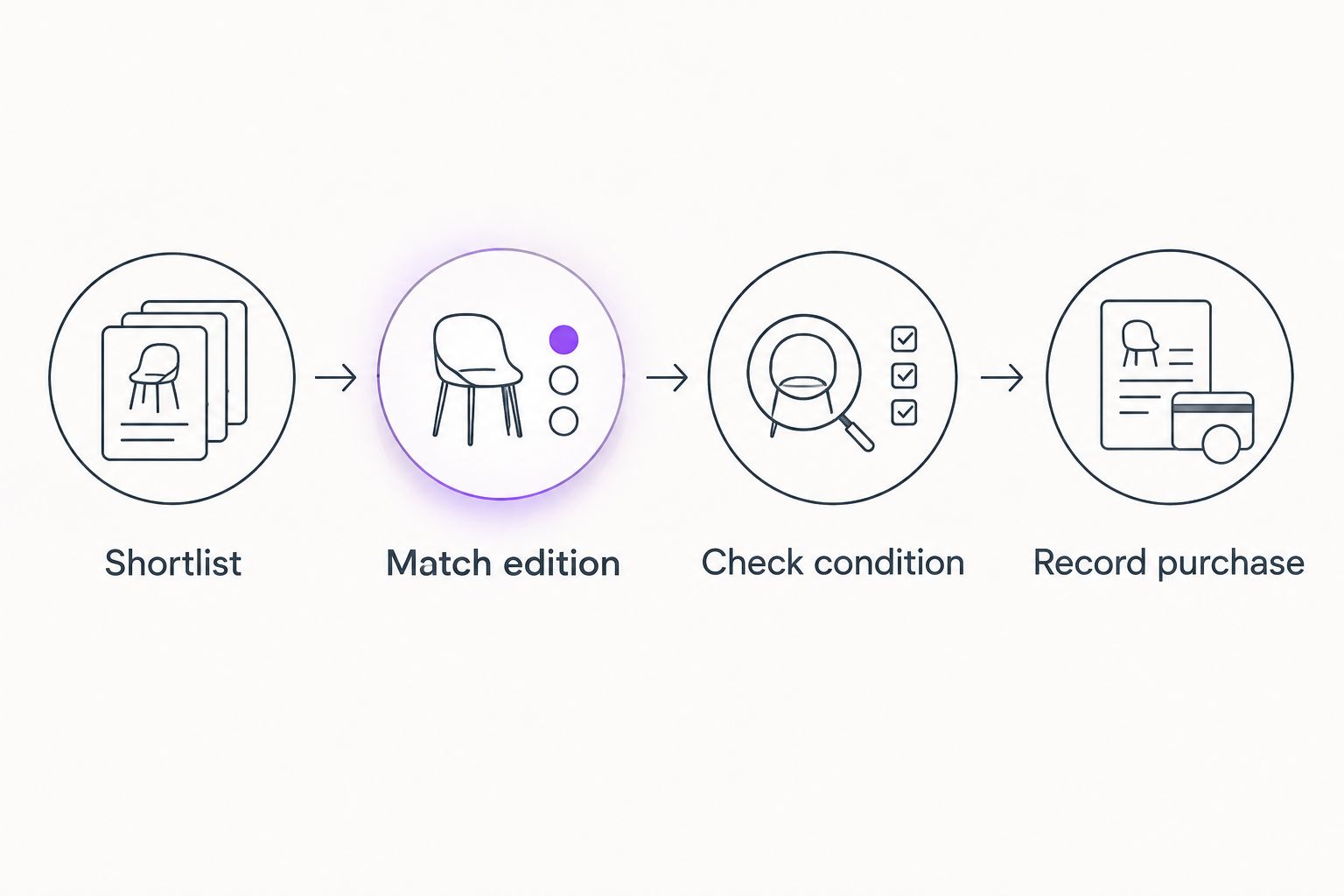
If an important detail remains unclear, leave the candidate undecided. You do not need to fill every place on your shortlist, and an unresolved edition question is a reason to pause rather than guess.
Choose the right shopping route
These are two ways to use the same list, not competing apps or store features. Choose according to whether your next reading choice is flexible or tied to a specific purpose.
| Workflow | Best for | Main advantage | Main limitation |
|---|---|---|---|
| Small buying shortlist | Readers choosing their next fiction or romance read | Keeps the decision focused on books you want soon | Requires manual updates after an order |
| Reading-prompt shortlist | Readers following a challenge or book-club plan | Connects each purchase to a clear reading purpose | Requires extra checks for prompt fit or edition requirements |
Use the small buying shortlist when your reading plans are flexible. Use the reading-prompt shortlist when a book must meet a requirement; do not substitute a loosely related title just to finish an order.
Purchase records and reading status
Close the loop after checkout
- Before submitting an order, check your home shelves and existing purchase records for the same title and author. Include unread books you already own.
- Review the order details and the seller's current shipping terms. Confirm that the physical copies still meet the requirements in your shortlist.
- After completing the order, enter Ordered under Purchase status in your own note. Keep the confirmation with that record.
- When the books arrive, compare each copy with the order description. Change the note to Owned after checking what you received.
- Update your StoryGraph reading status when your reading changes, not merely because you bought a copy.
Expected result: your note tracks ownership, while StoryGraph continues to track your reading plans and progress.
The distinction matters when you have unread books at home. Removing a book from your reading plans solely because you ordered it makes that book easier to overlook; leaving a purchased book on an unchecked shopping list makes it easier to buy twice.
Flippin Pages Bookstore fits this workflow as a source of affordable used books, not as a replacement for your purchase record. The workflow's limitation is manual upkeep: you must record the order yourself and check each listing before buying.
Browse books from your shortlist
Look for fiction and romance, then check each physical copy against your shopping note.
Refresh your list when your reading plans change
Your 2026 reading plans do not need to stay fixed. Use the same workflow whenever you add a promising book to StoryGraph or decide that an existing choice no longer suits you.
- Add the book to your reading plans first. Decide separately whether you want to own a physical copy.
- If you want it in your next order, add it to the active shortlist and remove a lower-priority choice.
- Check whether you already own it or have ordered it before looking for another copy.
- Repeat the edition and condition checks for any new candidate. Do not carry assumptions from a previous listing to a different copy.
Expected result: the shopping list changes with your reading interests instead of expanding every time you discover another title.
Because Flippin Pages Bookstore adds fresh finds each week, a weekly review is a useful routine. Set aside 10 minutes as your own browsing limit, review your existing shortlist first, and leave unrelated discoveries on your longer TBR.
For a 2026 reading challenge, add a Reading prompt field to your note. Record why a title fits, then verify that fit without reading plot summaries that reveal more than you want to know.
Troubleshooting
The title matches, but the author does not
Return to the StoryGraph entry and copy the full author name into your note. Different books can share a title, so a title-only search is not enough to establish a match.
The cover is different from the one on your TBR
Compare the author, format, and edition information instead of rejecting or accepting the copy based on artwork. If a specific edition matters to you, keep it as a written requirement.
A book looks familiar, but you cannot remember buying it
Pause and check your shelves, order confirmations, and Purchase status field. Search by title and author; do not place another order just because the cover differs from the copy you remember.
You bought the book but have not started it
Record ownership in your shopping note and keep your reading status aligned with what you have actually read. Purchasing and reading are separate events, so neither record needs to stand in for the other.
Every weekly browse adds more shopping choices
Return to your shortlist limit and move less urgent titles back to later interests. A browsing session can end without an order; finding another appealing book does not make it a better next read.
Customize your workflow
Add only fields that change a buying decision. For romance readers, a note about preferred tone or content boundaries can help; for series readers, the next needed volume matters more than a broad genre label.
If you share books at home, add Already in household before shopping. For gifts, keep the recipient's preferences separate from your own TBR so your reading taste does not become the default.
Keep your 2026 shortlist small enough to review before checkout. A detailed system is not useful if you stop checking it.
FAQ
How do I use my StoryGraph TBR list to shop for used books?
Copy a small selection into a separate shopping note, then check each used listing against the title, author, format, and edition you want. Record completed orders in that note so reading plans do not become duplicate purchases.
Does this workflow automatically sync StoryGraph with a bookstore?
No. This guide uses a manual handoff between your StoryGraph reading list, a shopping note, and individual book listings; it does not require an automated connection.
Should I change my StoryGraph reading status when I buy a book?
Keep reading status tied to your reading activity rather than your purchase. Use a separate ownership record for books you have ordered or received but have not started.
What should I check before buying a used romance book online?
Check the title, author, physical format, series position, and copy condition. If content boundaries matter to you, verify those separately without relying on spoiler-heavy plot summaries.
Is Flippin Pages Bookstore a place to read ebooks?
Flippin Pages Bookstore sells physical used books, including fiction and romance. This workflow is for choosing copies to buy, not for accessing ebooks or free online reading.
How often should I review my used book shortlist in 2026?
A weekly review is a practical routine when you are actively shopping. Review books you already shortlisted before adding new choices, and check your purchase record before ordering.
What if I cannot confirm the edition of a used book?
Leave the copy undecided until you can verify the edition details that matter to you. A familiar cover or matching title alone does not establish format, translation, or series volume.
One last thing
Check your unread shelf before your shopping list. The book that best fits your next reading mood might already be at home, even if it remains on your StoryGraph TBR.
Make that your final check for every 2026 order. Buy for the reading you want to do next, not simply to make a long list shorter.